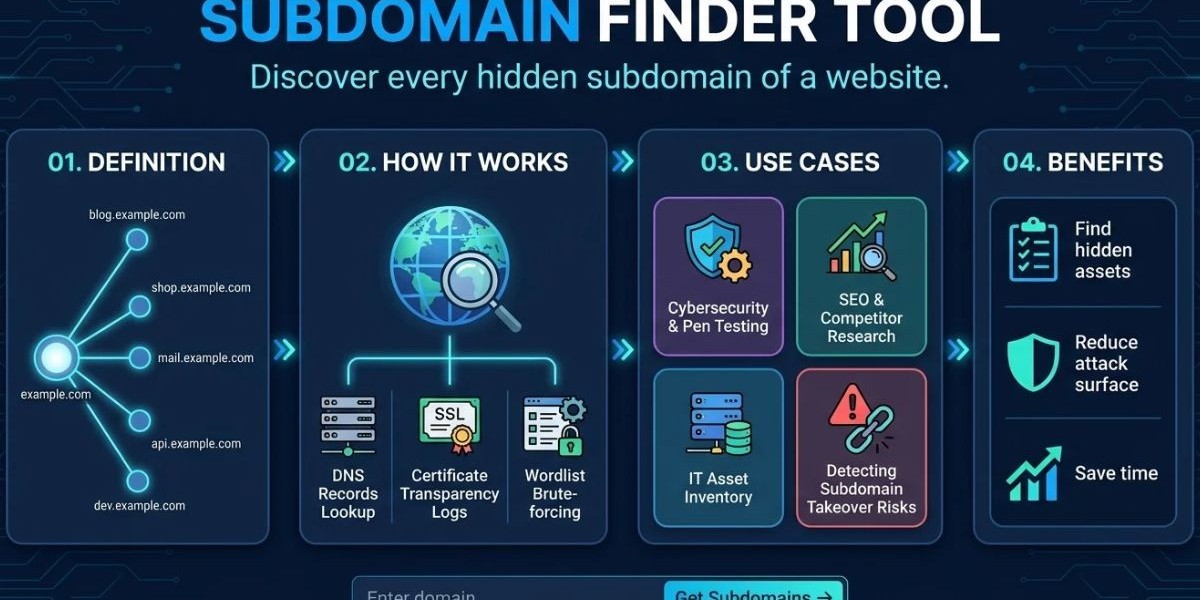

Picture a security analyst on the first day with a new client. The client hands over one domain name and says, "That's everything." An hour later, the analyst has found a staging portal, an old campaign microsite and a test API that nobody on the client's team could explain. None of them were on the asset list. This is the daily reality that a subdomain finder tool is built to expose.A subdomain finder is a tool that lists the subdomains attached to a root domain, such as portal.example.com or shop.example.com, by reading public records and testing likely names. To get a quick baseline, you can run the free subdomain finder tool from Mispar, which checks public DNS records, certificate logs and known naming patterns without asking you to sign up.
This guide is written for MSSPs, MDR providers, penetration testers, bug bounty hunters and IT security teams. It explains the methods behind subdomain discovery, shows a repeatable workflow and gives you a checklist for judging any tool. It also covers role-specific playbooks, the limits of free tools and the errors that quietly ruin results. Each section stands on its own, so you can jump to the part you need.
What Is a Subdomain Finder?
A subdomain finder is software that discovers hostnames under a domain you specify. It pulls names from public sources, tests common guesses and returns a list you can verify. Teams use it to build an inventory of external-facing assets, find forgotten servers and shrink the attack surface before an attacker maps it for them.
The Idea in Plain Terms
Think of a domain as a building and subdomains as the doors. The main website is the front entrance. Staging servers, admin panels, regional sites and vendor portals are side doors, loading docks and basement hatches. Security teams often guard the front door well and forget the rest. A finder walks around the building and writes down every door it can see.
Other Names for the Same Job
You will see this category described in several ways: subdomain scanner, subdomain enumeration tool, subdomain discovery tool, subdomain lookup tool, subdomain checker, subdomain search tool, subdomain extractor, subdomain detector and subdomain mapper. Marketing language changes, but the core task does not. The tool starts with a root domain and ends with a list of related hostnames.
What Counts as a Subdomain
Any name that sits below a registered domain counts. That includes simple names like blog.example.com and deeper names like api.eu.example.com. Each can resolve to its own server or to a third-party service. That flexibility is why subdomain lists grow quickly and why they are hard to manage by memory alone.
How a Subdomain Finder Tool Works
A subdomain finder tool works in three stages: collect candidate names, confirm which ones exist and report what it found. The collection stage is where tools differ most. Some read public data only, some guess names with wordlists and many do both. Strong tools combine several sources because every source has blind spots.
Stage One: Collecting Candidates
Candidate names come from places where hostnames leave a public trace. Certificate transparency logs, public DNS datasets, search engine indexes, archived web pages and open-source intelligence (OSINT) feeds are common examples. This approach is called passive reconnaissance because it reads what already exists rather than probing the target.
Stage Two: Confirming Names
A candidate is only useful if it exists. The tool asks DNS whether each name resolves and records the answer. A name might resolve to an IP address, point to another hostname through a CNAME record, or fail to resolve at all. Failed names are not always useless. A record that once existed can still hint at past infrastructure.
Stage Three: Reporting
The report is usually a list of hostnames. Richer reports add IP addresses, alias targets and the source that revealed each name. Context matters because it helps you decide which hosts deserve attention first.
How Certificate Transparency Helps
Certificate transparency is a public logging system for TLS certificates. When a certificate is issued for a name, the certificate can appear in a public log. Anyone can search those logs, including defenders and attackers. A test server that received a certificate may therefore be listed even if no page links to it.
How Brute-Forcing Fits In
Brute-forcing is an active technique. The tool takes a wordlist, builds names like vpn.example.com or qa.example.com and queries DNS for each one. It can find hosts that never appeared in a public source. It can also create lots of traffic, so use it only on domains you own or have written permission to test.
Naming Patterns Matter
People name things in predictable ways. Environments are called dev, test, qa, uat, stage and prod. Services are called api, mail, cdn and sso. Because of those habits, a finder that tries known patterns often succeeds where random guessing fails. Mispar's tool page lists known naming patterns among the things it checks.
The Wildcard Problem
A wildcard DNS record answers for any name under a domain. If a tool tries a made-up name and still gets an answer, it can mistake noise for real hosts. Mature tools test for this behavior first and filter false answers. When a brute-force list looks suspiciously huge, wildcard DNS is the first thing to check.
How to Find Subdomains of a Domain: A Repeatable Workflow
To find all subdomains of a domain, combine passive sources, add active tests only with permission, then verify and record the results. The workflow below works for client onboarding, bug bounty scoping and internal audits. Follow the same steps each time so results are comparable from one month to the next.
Define the scope in writing. List the root domains you are allowed to test and note any exclusions. This protects you and your client.
Start with a passive baseline. Run a quick online scan so you have a first list within minutes.
Cross-check with certificate logs. Search public certificate data for the domain to catch names the baseline missed.
Query search engines. Use operators such as site:example.com -www to see indexed hosts. This is the basic idea behind subdomain discovery with Google dorks.
Add active enumeration if authorized. Use a wordlist, rate-limit your queries and filter wildcard answers.
Merge and deduplicate. Combine every list into one file, remove repeats and normalize the names to lowercase.
Resolve every name. Record the IP address or CNAME target for each result.
Classify each host. Mark it as known and owned, known but unowned, or unknown.
Escalate unknowns. Ask the client or the internal team who owns each unknown host and whether it is still needed.
Save and schedule. Store the dated list and set a reminder to repeat the process.
Step two is where a browser-based subdomain finder tool saves the most time, because there is nothing to install and no account to create. Treat the output as a first draft. Mispar's own page states that no tool finds every subdomain and that the list is a starting point, not a full attack surface audit.
What to Do with Unknown Hosts
When you find a host nobody recognizes, resist the urge to panic. Start with simple questions. Does it resolve? What does it serve? Who registered the certificate? Is there a login page? Answers to those questions tell you whether the host is harmless leftover or a live risk. Hosts you cannot justify should be retired.
How Often to Repeat the Process
Subdomains change whenever teams launch campaigns, test new tools, or move vendors. Many teams check monthly and again after any major launch. For fast-moving organizations, a weekly passive check can catch new hosts sooner. Pick a rhythm you can keep, because a consistent small process beats an ambitious one you abandon.
Why Security Teams and MSSPs Need a Subdomain Finder
Security teams need a subdomain finder because every unmanaged hostname is an unmonitored entry point. Most breaches do not begin at the polished homepage. They begin at something nobody remembers owning. A regular subdomain inventory turns that hidden risk into a managed list with owners and deadlines.
Role-Based Playbooks
Different roles use the same tool in different ways. The short playbooks below show how.
MSSP and MDR analysts: Run a baseline during onboarding, record the list in the client file and compare it at each quarterly review. Flag new hosts and ask the client to explain them. This gives the client a visible, repeatable deliverable.
Penetration testers: Use the subdomain list to scope the engagement. Group hosts by function, such as authentication, content, or internal tools, then plan tests around the most sensitive groups first.
Bug bounty hunters: Enumerate within the program's scope, look for hosts that appear to run older stacks and check for dangling DNS records. Always follow the program rules and report responsibly.
IT administrators: Compare the finder's list with your CMDB or asset register. Differences show shadow IT and missing documentation.
SEO and web teams: Look for leftover test sites that search engines may have indexed and for old microsites that dilute site quality.
Shadow IT and Vendor Sprawl
Shadow IT is any technology a team adopts without central review. A vendor-hosted help desk, a marketing landing page builder, or a developer sandbox can each live on a subdomain. The finder shows you where those pieces connect to your brand, which starts the conversation about ownership and risk.
Credential Exposure Around Forgotten Hosts
Old login pages and test portals are attractive for credential stuffing because they may lack modern protections. Knowing they exist lets you add controls or shut them down. For MSSPs that also monitor leaked credentials, a subdomain list is a useful companion to dark web monitoring: one shows which doors exist and the other shows whether keys to them are being traded.
Subdomain Takeover: The Risk Hiding in DNS
A subdomain takeover occurs when a DNS record points to an outside service that no one controls anymore, allowing a stranger to claim that service and serve content at your hostname. It is a clear example of why a finder is worth running. The problem is simple to understand and usually simple to fix once you see it.
A Typical Sequence
A team creates docs.example.com and points a CNAME record at a documentation host. Later, the team ends the contract but forgets the DNS record. If the provider allows a new customer to register that same name, the new customer can publish pages on docs.example.com. Visitors see your hostname and trust it.
Why It Matters
A hijacked subdomain can host phishing pages or malicious downloads under a name people recognize. Some setups can even expose cookies shared across the domain. The OWASP Web Security Testing Guide includes a test for subdomain takeover, which confirms that the risk is well understood in application security.
How to Reduce the Risk
Review CNAME targets for every subdomain on your list. Ask whether each outside service is still in use. Remove DNS records for anything you no longer need and remove them before canceling a service rather than after. Add DNS cleanup to your offboarding checklist for vendors and projects.
Key Features to Look For in a Subdomain Finder Tool
The right subdomain finder tool is accurate, clear about its sources, easy to repeat and safe to run. No single product wins for every user, so judge tools against your own workflow. Use the checklist below when you compare options.
Evaluation Checklist
Source transparency. Does the tool say where names come from? Certificate logs, public DNS and naming patterns are all legitimate sources.
Passive mode. Can you run it without touching the target? This lowers risk and speeds up checks.
Active mode. If brute-forcing is offered, can you control speed and wordlists?
Wildcard handling. Does it detect and filter wildcard answers?
Resolution details. Does it show IP addresses or CNAME targets?
Deduplication. Does it merge repeats so the list is clean?
Access model. Is signup required, or can you run a check right away?
Export and automation. Can you save results or reach the tool through an API or command line?
Privacy. Is it clear what the tool does with the domains you submit?
Honesty about limits. Does the vendor admit that no tool finds everything?
Browser Tools vs. Command-Line Tools
Browser tools win on convenience. You paste a domain and read the answer. Command-line tools win on control. You can script them, schedule them and chain their output into other programs. Many professionals use both: a browser tool for a quick look and a command-line tool for deeper or repeated work.
Free vs. Paid
Free tools cover the basics and suit quick checks. Paid platforms often add bigger datasets, history, alerts and team features, though features and prices differ by vendor, so check each provider directly. A sensible approach is to start free, note what you miss and pay only when a gap costs you real time.
Safety First
Whatever you choose, the safest tool is one that uses public information and does not touch the target directly. Mispar's page says its discovery uses public DNS records only and does not touch the target server directly. Even so, it advises getting authorization before scanning infrastructure you do not manage and that advice applies to every tool.
Comparing Methods and Tools
Methods differ in coverage, noise and effort. Passive methods read public data and are quiet. Active methods guess names and reach further but create traffic and need permission. Manual work teaches you the data, while automation keeps watch at scale. The table below compares the common options side by side.
Passive vs. Active in One Minute
Passive discovery is the right first move for almost every job. It is fast, quiet and low risk. Active discovery is the right second move when scope allows it, because it can reveal hosts that never appeared in public records. Using both gives broader coverage than either one alone.
Subdomain Finder vs. DNS Lookup
A DNS lookup answers questions about a name you already know. A subdomain finder helps you discover names you do not know. If you ask a DNS lookup about vpn.example.com, you get its records. If you ask a finder about example.com, you get a list of possible hostnames to look up. Use the finder first and the lookup second.
Comparison Table
Method or Tool Type | Data Source | Speed | Risk to the Target | Best Use |
Mispar Subdomain Scanner | Public DNS records, certificate logs, known naming patterns | Fast, runs in a browser | Low, discovery uses public records only | Quick baseline with no signup |
Certificate log search | Public certificate transparency data | Fast | None | Spotting hosts that received certificates |
Search engine operators | Indexed web pages | Fast | None | Finding public-facing hosts |
Open-source passive tools (for example, Subfinder) | Multiple passive sources | Fast after setup | Low | Scripted, repeatable passive runs |
Open-source mapping frameworks (for example, OWASP Amass) | Passive and active techniques | Moderate | Varies by mode | Broader attack surface mapping |
Python and GitHub tools (for example, Sublist3r) | Search engines and other sources | Moderate | Low to moderate | Learning, scripting, quick checks |
Wordlist brute-force | Active DNS queries | Slow to moderate | Higher, creates traffic | Finding unlisted hosts when authorized |
Commercial data platforms | Aggregated and historical datasets | Fast | None to the target | Historical research and large portfolios |
Tool Categories You Will Meet
Searches for a subdomain finder often include a platform name. The notes below explain the categories without ranking them. Always read each project's current documentation, because features and maintenance status can change.
Kali Linux and GitHub
Kali Linux is a distribution built for security testing. Many enumeration tools can be installed from its package repositories or downloaded from GitHub. When you look for a subdomain finder on Kali or GitHub, check the repository's recent activity, open issues and documentation before you trust it with client work.
Python Scripts and Sublist3r Alternatives
Sublist3r is a widely known Python tool that gathers names from several online sources. People look for a Sublist3r alternative when they want more sources, more speed, or active maintenance. Writing a subdomain finder in Python is also an option for learning. A basic script reads a wordlist and resolves each name, but a reliable one must handle wildcards, timeouts and rate limits.
Amass Alternatives and Passive-Only Tools
OWASP Amass is an open-source project for attack surface mapping and external asset discovery. Subfinder, from ProjectDiscovery, is built around passive discovery. If you search for an Amass alternative, the right pick depends on whether you value breadth or speed. Try both on a domain you own and compare results.
Chrome Extensions
Some browser extensions list hostnames seen on a page or call an outside lookup service. They are handy but narrow. Review the permissions an extension requests, since browser extensions can access a lot of browsing activity.
APIs
Some data providers offer a subdomain finder API for automated lookups. An API is useful when you need to enrich many domains at once. Confirm the provider's terms, rate limits and data sources in its documentation, since these differ by vendor.
Using a Subdomain Finder for SEO and Site Audits
A subdomain finder is also a useful SEO audit aid. Sites often run blogs, help centers and regional versions on subdomains and old test hosts sometimes remain reachable. Finding them lets you clean up duplicate or outdated content and understand how a site is organized.
Audit Use Cases
During a site audit, a subdomain list can reveal staging copies that search engines may have indexed, retired campaign pages that still respond and separate hosts for support or documentation. Each of these can affect how clean and trustworthy a site looks to visitors and crawlers.
Competitor Context
Public subdomain data can hint at how another company structures its web presence, such as separate hosts for docs, community, or product areas. Stick to public information, follow the terms of any service you use and do not scan systems you have no right to test.
Common Mistakes That Ruin Subdomain Results
Most poor results come from a few repeated habits, not from the tools themselves. Avoid the following.
Trusting a single source. Every tool has gaps. For important domains, compare at least two.
Calling the list complete. Subdomains that are not in certificate logs, not in public DNS and do not use a common name may not appear.
Skipping the resolution check. A name on a list is not proof of a live host.
Overlooking wildcard certificates. A wildcard certificate covers many names without listing each one, so certificate logs may show only a wildcard entry.
Scanning without approval. Always get authorization before testing systems you do not manage.
Failing to date the results. Without dates, you cannot tell what changed.
Stopping at discovery. A list without owners and deadlines does not reduce risk.
Ignoring CNAME targets. Dangling pointers are easy to miss if you only look at IP addresses.
Interesting Facts About Subdomains and Discovery
The following facts come from public specifications and documentation.
DNS is a hierarchy. The original DNS specification, RFC 1034, describes the namespace as a tree of domains, which is why every subdomain sits under a parent name.
Certificate transparency logs are append-only. RFC 6962 describes them as public logs built on a Merkle tree structure, which makes quiet tampering with past entries detectable.
Browser makers pushed adoption. Apple announced that Safari would require certificate transparency for certificates issued after October 15, 2018, following earlier enforcement by Chrome.
Let's Encrypt logs its certificates. The free certificate authority publishes the certificates it issues to certificate transparency logs, so many small sites appear in public search.
Wildcard certificates limit visibility. A certificate for a wildcard name covers many subdomains, so logs may show the wildcard rather than each individual host.
Attacker behavior is documented. The MITRE ATT&CK framework lists searching open technical databases, including digital certificate data, as a reconnaissance technique, which shows why defenders should look at the same sources.
Conclusion
A subdomain finder gives you the first thing any security program needs: a clear list of what you actually expose. From that list you can assign owners, retire old hosts, fix risky DNS records and watch for change. Without it, you protect the assets you remember and miss the ones you do not.The strongest approach is simple. Run a passive subdomain finder tool for a fast baseline, cross-check with certificate logs and search operators, add active enumeration only when you have permission and repeat on a schedule. Write down every result and give each host an owner. If you want a free starting point, the Mispar scanner runs online without signup and states clearly that it is a starting point, not a complete audit.For MSSPs and security teams that want to turn this kind of visibility into a managed service, take a look at Mispar and the other tools built for that work.
Frequently Asked Questions (FAQs)
What is the best way to find all subdomains of a domain?
Combine a passive subdomain finder tool, a certificate log search and a search engine query, then add authorized brute-forcing if needed. Merge the lists, resolve each name and verify ownership. No single tool finds every subdomain, so layered methods give the best coverage.
Are free subdomain finder tools reliable?
Free tools can be reliable for the sources they cover, such as public DNS records and certificate logs. They can miss hosts that appear in neither source. Use a free tool for a quick baseline and confirm important findings with a second method.
What is the difference between a subdomain finder and a DNS lookup?
A DNS lookup returns records for a name you already know. A subdomain finder discovers names you may not know. Use the finder to build a list of hostnames, then use DNS lookups to inspect each one.
Do I need permission to use a subdomain finder?
Passive tools read public data, but you should still get authorization before scanning infrastructure you do not manage, especially for active techniques. For bug bounty work, follow the program scope. For legal questions, consult a qualified professional.
How often should I scan for new subdomains?
Many teams scan monthly and again after major launches. Fast-changing organizations may run a passive check weekly. Compare each result with the previous one to catch new, changed, or removed hosts.
Can a subdomain finder help prevent subdomain takeover?
Yes, indirectly. A finder gives you the full list of hostnames and you can then review each one's DNS records for pointers to unused outside services. Removing stale records before a service is canceled closes the most common takeover path.