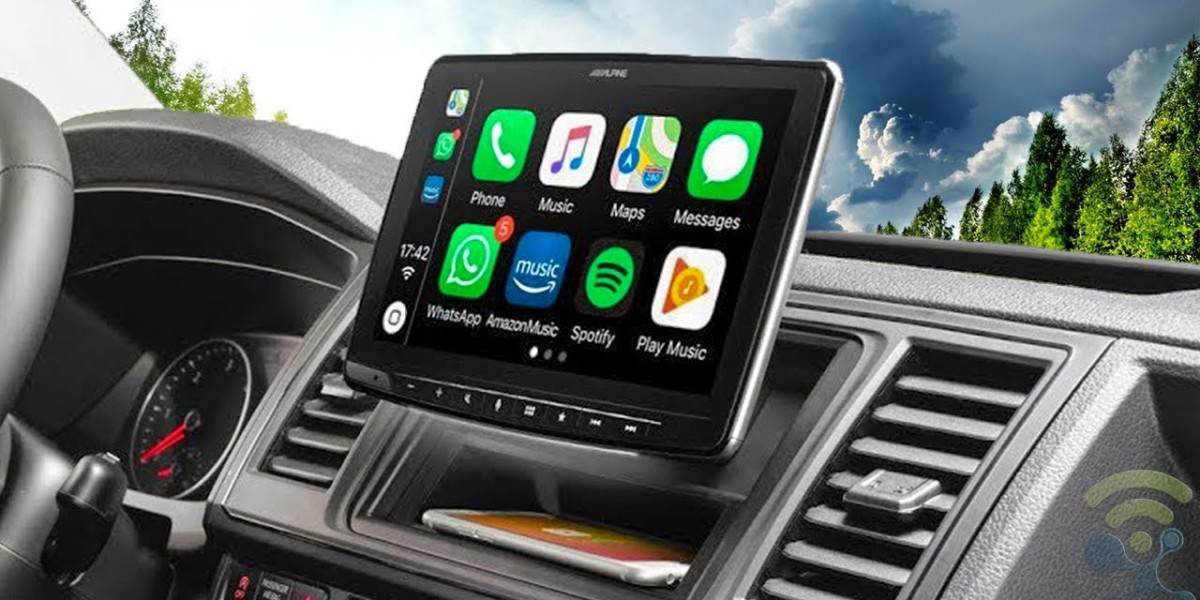

Modern vehicles are becoming more connected, and drivers increasingly expect their dashboards to offer the same convenience they enjoy from their smartphones. Navigation, music streaming, hands-free communication, and voice assistance have become important parts of the driving experience. Older factory stereos may provide basic entertainment, but they often lack the flexibility and connectivity needed for today's digital lifestyles. Upgrading the dashboard with a modern multimedia system can bring these features together in one accessible interface.
A well-planned infotainment upgrade does more than replace an outdated radio. It can make everyday journeys easier by providing familiar smartphone functions through the vehicle's display. Drivers can follow navigation instructions, manage playlists, make calls, and access compatible applications without constantly handling their phones. However, choosing the right equipment requires attention to compatibility, screen design, installation requirements, and the features that matter most.
Why Modern Smartphone Integration Matters on the Road
Smartphone integration has changed how drivers interact with their vehicles. Instead of relying entirely on a traditional radio interface, users can access selected phone applications through a dashboard display. This creates a more familiar experience and reduces the need to switch between separate devices while traveling.
Navigation is one of the most practical advantages. Compatible mapping applications can provide turn-by-turn directions, traffic updates, and route adjustments. Drivers can plan journeys more easily and receive visual guidance directly from the dashboard. This is especially useful when traveling through unfamiliar areas or dealing with changing traffic conditions.
Entertainment also becomes more convenient. Drivers can access supported music and audio applications, select playlists, and listen to podcasts through the vehicle's sound system. Hands-free calling and voice commands add another layer of convenience by allowing users to manage common tasks while keeping their attention on the road.
The key benefit is integration. Rather than treating navigation, communication, and entertainment as separate functions, a connected dashboard brings supported features into one organized environment.
Choosing the Right Connected Multimedia Receiver
Selecting Android Auto-compatible dashboard receivers involves more than comparing screen sizes or advertised features. The best option should suit the vehicle, support the driver's preferred smartphone functions, and work effectively with the existing audio equipment.
Start by checking smartphone compatibility. Android Auto is designed to connect compatible Android phones with supported vehicle displays and receivers. Depending on the model, the connection may use a USB cable or wireless technology. Wireless functionality can make everyday use more convenient, but it requires compatible hardware and a supported phone.
Next, consider the display. A larger screen can make maps and menus easier to view, but screen size alone does not determine usability. Resolution, brightness, touch responsiveness, viewing angles, and interface layout all influence the experience. A responsive display with clear icons and straightforward menus can be more practical than a larger screen with a confusing interface.
It is also worth checking the receiver's audio connections and expansion options. Some models offer multiple preamp outputs, dedicated subwoofer controls, equalizer adjustments, Bluetooth connectivity, and support for external cameras. These features can be valuable when building a more advanced car audio system.
Before purchasing, confirm the exact model's specifications and vehicle fitment requirements. Dashboard dimensions, wiring connections, steering-wheel controls, and factory amplifier compatibility can vary considerably between vehicles.
Features That Improve Everyday Driving
A modern infotainment system should offer practical functions that make driving more convenient. Understanding these features helps buyers distinguish useful capabilities from specifications that may not matter for their daily needs.
Navigation and traffic information: Supported navigation applications can display routes, estimated arrival times, and traffic conditions. Live information may depend on the connected smartphone, application permissions, and an active data connection.
Voice assistance: Compatible voice controls allow drivers to request directions, select music, or manage calls using spoken commands. This can reduce the need to interact with the touchscreen while driving.
Music and podcast streaming: Access to compatible entertainment applications gives drivers more listening choices than a traditional radio alone. Audio can play through the vehicle's speakers, making the dashboard part of a connected entertainment environment.
Hands-free communication: Bluetooth and supported smartphone integration features can help drivers make and receive calls through the vehicle's audio system. Microphone quality and placement influence how clearly conversations are transmitted.
Wireless connectivity: Some receivers support wireless smartphone integration, removing the need to connect a cable every time the vehicle starts. Actual availability depends on the receiver, phone, software version, and connection requirements.
Not every receiver includes all these capabilities. Reviewing the manufacturer's feature list before purchasing helps ensure the selected system provides the functions that will actually be used.
Display Design, Controls, and Dashboard Compatibility
The dashboard is the main interaction point between the driver and the infotainment system. Its design should make essential functions easy to access without creating unnecessary distractions.
Touchscreen responsiveness is particularly important. Delayed inputs can make simple tasks frustrating, while a clear menu structure helps drivers locate navigation, audio, and communication functions more efficiently. Physical buttons or rotary controls can also be useful for frequently adjusted settings such as volume.
Screen placement deserves equal attention. The display should remain visible from the driver's normal seating position without obstructing the road view or covering important vehicle controls. Some vehicles have dashboard shapes that require specific mounting kits or trim adapters to achieve a clean installation.
Check whether the receiver supports existing vehicle features. Depending on the vehicle and equipment, an installation may require interface modules to retain steering-wheel controls, factory cameras, parking sensors, or other integrated functions. A compatible wiring harness can simplify connections and reduce the need to modify original wiring.
A professional fitment assessment is especially useful for vehicles with factory amplifiers, premium sound packages, or integrated dashboard electronics. Confirming these details before installation can prevent unexpected compatibility problems.
Improving Audio Performance Alongside Connectivity
A dashboard upgrade can also create an opportunity to improve the vehicle's sound system. However, smartphone connectivity and audio quality are separate considerations. A receiver may provide excellent application support while offering only basic sound adjustments.
Look for audio controls that match the needs of the existing system. Equalizer settings can help adjust frequency balance, while time alignment can improve the way sound reaches the driver's listening position. High-pass and low-pass filters can also help coordinate door speakers and subwoofers.
Preamp outputs are important when adding external amplifiers. They provide signal connections for expanding the system beyond the receiver's built-in power. The number and configuration of these outputs should match the planned amplifier arrangement.
If the vehicle already has aftermarket speakers or a subwoofer, check the receiver's output specifications and available tuning options. A carefully matched setup can provide convenient smartphone access while maintaining balanced, controlled sound throughout the cabin.
Installation and Setup: Getting Everything Working Together
A successful upgrade depends on correct installation and configuration. Begin by identifying the receiver's wiring requirements and the vehicle's factory connections. Use the appropriate mounting hardware and interface accessories rather than forcing a universal unit into an incompatible dashboard opening.
Once installed, configure the smartphone connection according to the manufacturer's instructions. For a wired connection, use a suitable data-capable USB cable and the designated port. For wireless operation, follow the receiver's pairing process and confirm that the phone supports the required connection method.
After connecting, test the essential functions individually. Check navigation, audio playback, calling, microphone performance, Bluetooth pairing, and steering-wheel controls where supported. Also confirm that the system starts reliably and reconnects as expected.
Keep the receiver's software and compatible phone applications updated. Updates can improve stability, address compatibility issues, and introduce refinements to supported functions. Avoid changing settings while driving; complete initial configuration and troubleshooting while the vehicle is safely parked.
Making a Smart Infotainment Investment
Choosing a new dashboard system should begin with a clear understanding of daily driving needs. Some drivers prioritize navigation and hands-free communication, while others want wireless connectivity, extensive audio controls, camera support, or a larger touchscreen.
Create a list of essential features before comparing models. Then consider the total installation cost, including mounting accessories, wiring interfaces, and any additional components needed to retain factory functions. A receiver with a lower purchase price may require more accessories, so evaluating the complete setup gives a more realistic comparison.
At Elite Auto Gear, selecting compatible car audio equipment means considering how each component fits into the vehicle and the wider entertainment system. Taking time to verify specifications and installation requirements helps avoid unnecessary expenses and creates a more reliable upgrade.
A More Connected Dashboard for Every Journey
A modern infotainment upgrade can make driving more convenient by bringing supported navigation, communication, and entertainment functions into one dashboard interface. The strongest results come from choosing a compatible receiver, checking the vehicle's electrical and physical requirements, and configuring every feature correctly. With thoughtful planning, drivers can enjoy a cleaner dashboard experience, easier smartphone access, and greater flexibility for future audio upgrades.